Color & export
Why Exported Black Screens Turn Gray (0–255 vs 16–235 Fix)
Fix washed-out #101010 gray exports in Premiere Pro, DaVinci Resolve and FFmpeg by matching Limited (16–235) vs Full (0–255) video levels.
By Black Screen Video · · 6 min read
When a black title card or transition looks pitch black inside your editor but exports as a milky charcoal rectangle (#101010) against a player's true-black letterbox bars, the file itself usually is not damaged. Almost every case comes down to a luma range mismatch between Limited / Video levels (16–235) and Full / Data levels (0–255).
This guide measures our real 1080p download (black-1080p-10s.mp4) in FFmpeg 8.1, reproduces the exact RGB(16, 16, 16) gray shift, and shows how to prevent it in Premiere Pro, DaVinci Resolve, Final Cut Pro, CapCut, and FFmpeg.
1. Why 8-bit H.264 stores reference black at Y = 16
Consumer H.264, HEVC and VP9 MP4/WebM files almost universally use 8-bit yuv420p with Limited (TV / Legal) range, standardized in ITU-R BT.709:
- Reference black is stored at
Y = 16(not0), with neutral chromaU = 128, V = 128. - Reference white is stored at
Y = 235(not255). - Code values
1–15("footroom") and236–254("headroom") reserve transient overshoot space for broadcast hardware.
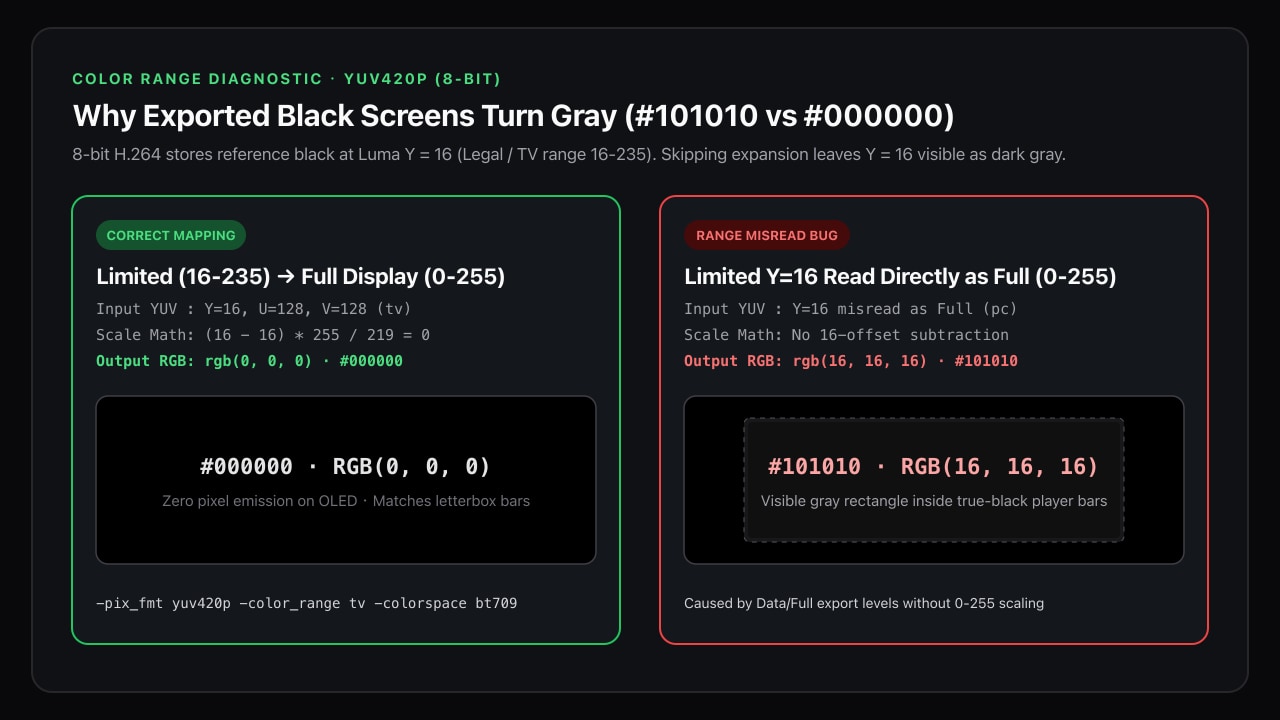
When a standards-compliant player decodes a Limited-range stream for a computer or phone screen (0–255 RGB), it expands 16–235 to 0–255:
R = G = B = round((16 - 16) * 255 / 219) = 0 -> #000000If an editor or export preset tags that Y = 16 stream as Full / Data (0–255) without scaling the pixel values — or scales Limited range twice (16 -> 30) — the player skips subtracting 16 and outputs RGB(16, 16, 16) (#101010) directly to the display.
2. Inspect a clip's actual luma values before blaming the monitor
Download black-1080p-10s.mp4 (8,403 bytes) from the 1080p black screen page or 10-second tool, then measure its raw YUV planes with signalstats:
ffmpeg -hide_banner -i black-1080p-10s.mp4 -frames:v 5 \
  -vf "signalstats,metadata=print:file=-" -an -f null -
In our FFmpeg 8.1 benchmark (technical-benchmarks.json), every H.264 sample (720p, 1080p, 4K, 8K, and 9:16) reported identical luma and chroma values:
| Property | Measured value (black-1080p-10s.mp4) | Meaning |
|---|---|---|
pix_fmt | yuv420p | 8-bit planar YUV 4:2:0 |
YMIN / YMAX / YAVG | 16 / 16 / 16 | Exact BT.709 Limited-range reference black |
UMIN / UMAX | 128 / 128 | Zero blue-yellow tint |
VMIN / VMAX | 128 / 128 | Zero red-green tint |
| Mapped Limited → Full RGB | rgb(0, 0, 0) (#000000) | True display black |
| Misread as Full RGB | rgb(16, 16, 16) (#101010) | Elevated dark gray |
If your own exported MP4 reports YMIN=30 (double-compressed levels) or YMIN=16 paired with color_range=pc in ffprobe, players will render it gray on every calibrated display.
Check the container and VUI color flags with ffprobe:
ffprobe -v error -select_streams v:0 \
  -show_entries stream=codec_name,pix_fmt,color_range,color_space,color_primaries,color_transfer \
  -of default=noprint_wrappers=1 your-export.mp4
For standard web and social delivery, you want pix_fmt=yuv420p and color_range=tv (or unspecified, which browsers treat as tv for Rec.709 H.264) with YMIN=16.
3. Exact export settings by editor
| Application | Setting to verify | Avoid |
|---|---|---|
| DaVinci Resolve | Deliver → Video → Advanced Settings → Data Levels: Auto (or Video for H.264/MP4). On macOS, enable Use Mac display color profiles if checking preview gamma. | Forcing Data Levels: Full on an H.264 yuv420p delivery without matching timeline scaling. |
| Adobe Premiere Pro | Sequence Settings → Working Color Space: Rec. 709. Export H.264 without stacking a manual Levels or Lumetri black-pedestal lift. Check Lumetri Scopes (Waveform Luma) so black sits at 0 IRE. | Judging black by eye in QuickTime Player on macOS without checking Waveform 0 IRE (QuickTime applies a 1.96 vs 2.4 gamma tag difference, which affects midtones rather than 0 IRE black). |
| Final Cut Pro | Standard Rec. 709 library → Share → Computer / Web Hosting (H.264). Confirm the Waveform monitor rests on 0 IRE across the black gap. | Mixing an HDR Rec. 2020 HLG/PQ timeline with SDR clips without an HDR Tools color-space conformity step. |
| CapCut / Mobile apps | Keep Adjust → Fade / Brightness / Vignette at 0 on the black track, and turn off automatic "AI Color Enhance" or film-grain overlays on title gaps. | Applying a global LUT on an adjustment layer above the black clip — many vintage LUTs lift RGB(0,0,0) to RGB(18,18,22) for a matte film look. |
That LUT trap is the second most common culprit after range flags: if an adjustment layer spans your whole timeline, split or disable it over black-screen pauses so your fade-to-black actually reaches 0 IRE.
4. Stamp explicit Rec.709 Limited metadata with FFmpeg
When building automated pipelines or re-encoding a sequence for YouTube, Vimeo, or client review, write explicit VUI color metadata (bt709 + tv) so browsers and hardware decoders never have to guess:
ffmpeg -i black-1080p-10s.mp4 \
  -vf "fps=30,scale=in_range=tv:out_range=tv" \
  -c:v libx264 -crf 18 -pix_fmt yuv420p \
  -color_range tv -colorspace bt709 -color_primaries bt709 -color_trc bt709 \
  -an -movflags +faststart black-1080p-bt709-tv.mp4
In our FFmpeg 8.1 test run, black-1080p-bt709-tv.mp4 (27,105 bytes, 300 frames at 30 fps, SHA-256 in technical-benchmarks.json) preserved YMIN=16, YMAX=16, color_range=tv, color_space=bt709, and decoded to RGB(0, 0, 0) across every pixel.
If an upstream tool already handed you a broken export where Y=16 was falsely flagged as Full range (color_range=pc) without changing the pixels, you can repair the bitstream flag losslessly without re-encoding via FFmpeg's h264_metadata bitstream filter:
ffmpeg -i misflagged-full.mp4 -c copy \
  -bsf:v h264_metadata=video_full_range_flag=0 \
  -movflags +faststart fixed-tv-flag.mp4
Verify the repaired output with ffprobe and signalstats before publishing. If your workflow also inserts black clips between camera scenes, pair these color flags with the frame-count checks in our 10-second black gap guide.
Test notes and references
All measurements were executed on November 14, 2026 using FFmpeg and ffprobe 8.1 against black-1080p-10s.mp4 (8,403 bytes, SHA-256 924b9680ed5547c7460a760f043e1e8d1aba179f9706c425a1576b38e99a4135). Editor menu names reflect current desktop releases of DaVinci Resolve, Premiere Pro and Final Cut Pro; verify against scopes on your own machine.
See the FFmpeg signalstats filter, FFmpeg h264_metadata bitstream filter, and ITU-R BT.709 specification for normative quantization equations.