Vertical video
Keep White Text & Lyrics Crisp on a 9:16 Black Screen
Export sharp 1080×1920 lyrics and captions for Reels, Shorts, TikTok and Status using 30 fps timelines, safe zones and off-white contrast.
By Black Screen Video · · 5 min read
Minimalist lyric edits, poetry reels, WhatsApp Status quotes, and kinetic typography videos look effortless — white words over a pure 9:16 black canvas — yet frequently turn blurry, stuttery, or cropped after upload to Instagram Reels, YouTube Shorts, or TikTok.
Three technical traps cause almost all of that degradation: inheriting a 5 fps static source frame rate, chroma subsampling (4:2:0) + OLED halation on thin text, and placing captions inside platform UI overlay zones. Here is how to avoid all three using measured specs from our native portrait download.
1. Set your timeline to 30 fps or 60 fps before adding animated text
Open the 9:16 vertical black screen page and download black-9x16-30s.mp4 (or grab a landscape clip from the 30-second page if editing widescreen). In FFmpeg 8.1 (technical-benchmarks.json), our native portrait file measures:
- Dimensions:
1080 × 1920pixels (true9:16portrait — no rotation metadata needed) - Duration & size:
30.000seconds, 10,024 bytes (~9.8 KB), H.264yuv420p,YMIN=16 / YMAX=16, 0 audio streams - Source frame rate:
5 fps(150frames total, one frame every200 ms)
Encoding solid black at 5 fps keeps the download under 10 KB because unmoving black pixels look identical at 5 fps and 60 fps. However, many desktop and mobile editors automatically adopt the frame rate of the first clip dropped onto an empty timeline.
If your project sequence locks to 5 fps, every lyric fade-in, karaoke word highlight, or smooth scroll updates only once every 200 ms (150 steps over 30 seconds), making motion look choppy. Always create your 1080 × 1920 sequence at 30 fps (900 frames / 33.3 ms step) or 60 fps (1,800 frames / 16.7 ms step) first, then drop black-9x16-30s.mp4 onto Track 1 as the background.
If you prefer a pre-converted 30 fps Rec.709 master file for CLI or NLE templates, run:
ffmpeg -i black-9x16-30s.mp4 \
  -vf "fps=30,scale=in_range=tv:out_range=tv" \
  -c:v libx264 -crf 18 -pix_fmt yuv420p \
  -color_range tv -colorspace bt709 -color_primaries bt709 -color_trc bt709 \
  -an -movflags +faststart black-9x16-30s-30fps.mp4
In our FFmpeg 8.1 run, black-9x16-30s-30fps.mp4 measured 77,475 bytes (~75.7 KB), 900 decoded frames, 30.000 seconds, and RGB(0, 0, 0) across every frame.
2. Keep captions inside the 1080 × 1920 cross-platform safe zone
Reels, Shorts, TikTok, and WhatsApp Status all draw persistent interface chrome directly over your 1080 × 1920 frame — progress bars and camera/search icons at the top, like/comment/share buttons along the right rail, and username + audio-ticker captions across the bottom.
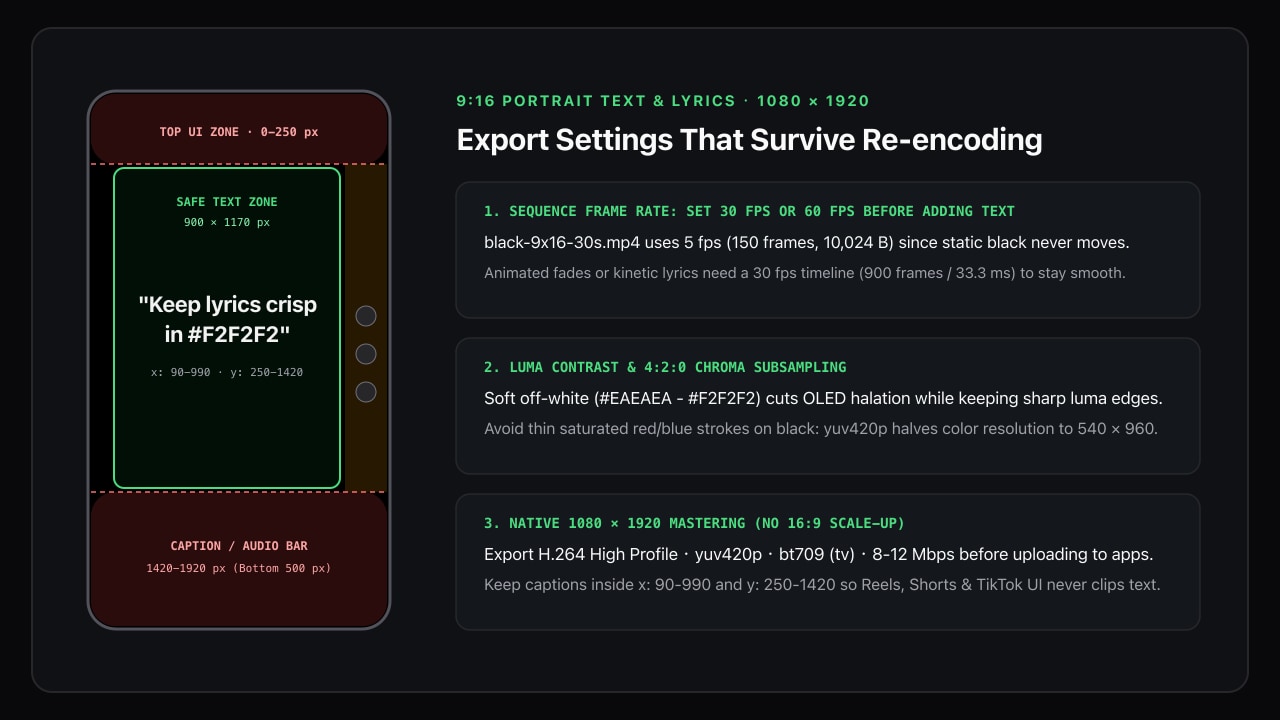
Use these pixel margins on a 1080 × 1920 canvas so one export works cleanly across all four apps without cropping or UI collisions:
| Margin | Hazard zone (1080 × 1920 px) | What overlaps here | Safe text coordinate |
|---|---|---|---|
| Top | y: 0 – 250 px | Status bar, Reels/Status progress bars, Search/Live icons | Keep text below y = 250 |
| Bottom | y: 1420 – 1920 px (500 px) | Creator handle, expandable caption, audio marquee, scrubber | Keep text above y = 1420 |
| Left | x: 0 – 90 px | Edge crop on taller 19.5:9 / 20:9 phones when zoomed to fill | Keep text right of x = 90 |
| Right | x: 990 – 1080 px (up to 160 px for icons) | Like, comment, share, bookmark, and audio disc stack | Keep text left of x = 920–990 |
Centering two- to three-line lyrics slightly above vertical midpoint (y: 680 – 1050) keeps eye level natural while staying well clear of bottom captions.
3. Beat 4:2:0 compression blur and OLED halation
Social platforms re-encode every upload into yuv420p (4:2:0 chroma subsampling): full 1080 × 1920 resolution is preserved for luma (brightness), while color (chroma) resolution is halved horizontally and vertically to 540 × 960.
That single fact explains why certain text styles fall apart after upload while others stay razor-sharp:
- Use soft off-white (
#EAEAEAto#F2F2F2) instead of100%#FFFFFF: Pure#FFFFFFon#000000relies on crisp luma contrast (which4:2:0preserves well!), but in dark rooms it triggers intense halation (blooming) on OLED phone screens and mild astigmatism blur for viewers. Stepping white down 5–8% to#F0F0F0/#F2F2F2cuts harsh glare while keeping luma edges tack-sharp. - Avoid thin saturated red, magenta, or blue text on black: Colored text on black depends on the half-resolution
540 × 960chroma plane, producing jagged blocks around thin strokes. If you highlight an active lyric word in color, choose a high-luminance pastel tint (such as warm gold#FDE68Aor mint#86EFAC) and use a Medium or SemiBold (500–600) sans-serif weight at48–68 pxheight. - Never scale up a
16:9clip to fill9:16: Scaling a1280 × 720background up2.67×in a poorly configured project can force your NLE to set the sequence canvas to405 × 720instead of1080 × 1920, permanently softening your vector text on export. Start with native1080 × 1920(black-9x16-30s.mp4). - Export H.264 High Profile at
8–12 Mbps(bt709Limited): Because almost the entire frame is flatRGB(0, 0, 0)black, macroblocks outside the text cost near-zero bits — virtually your entire bitrate budget goes directly to crisp glyph edges and fade transitions. Check our color-range export guide so the black background stays#000000instead of#101010.
Test notes and references
Source file measurements (black-9x16-30s.mp4, 10,024 bytes, SHA-256 cac99f5490051e143629fddd202f4a65befd80aa435560ca2277c408958bb8bf) and 30 fps conversion benchmarks (77,475 bytes, 900 frames) were run with FFmpeg/ffprobe 8.1 on November 14, 2026; see technical-benchmarks.json. Safe-zone pixel bounds consolidate public creator-ad-spec margins across Instagram Reels, TikTok and YouTube Shorts (1080 × 1920); test critical lower-third layouts on a real phone before batch-exporting a series.
See Meta's Reels Safe Zones guide, TikTok Creative Safe Zone specs, and the FFmpeg fps filter documentation.